To get the status of your devices and publishing processes, go to the Device section.
When you go to the section, the current status of your devices will be loaded and displayed. To update the status later, click Status update.
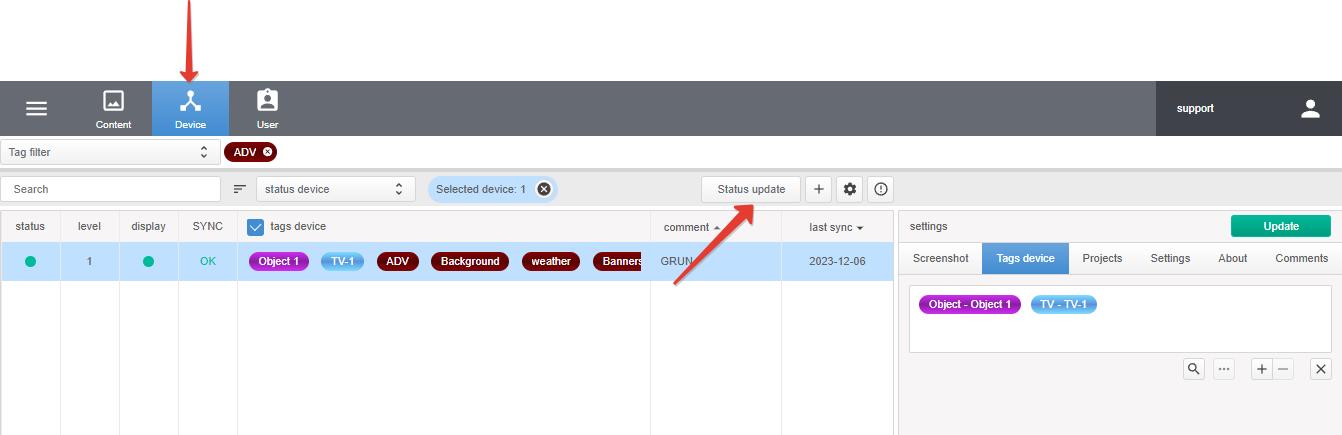
- statusPower status of the playback device. Green: enabled. Red: turned off or in sleep mode.
- levelPlayback device volume level.
- displayThe status of the display connected to the playback device. This is only relevant when using a TV-box and a TV or display connected to it (HDMI connection only). Green: enabled. Red: turned off or in sleep mode.
- SYNCSynchronization status of the playback device and the DS-GO.PRO server. Possible states
- OKthe device is synchronized. The content and schedule on the playback device are up to date.
- whitewaiting for synchronization opportunity: waiting for a response from the device.
- Loading iconthe schedule and content are synchronizing with the server.
- space limitthe playback device does not have enough internal or external memory (if an SD card or USB flash drive is used) to load published content.
- OFFLINEthe device is unavailable: it is turned off or the device does not have an Internet connection.